
Vibe Code Your FileMaker Apps #
Democratizing FileMaker Development—Build Sophisticated Interfaces with Just a Description #
Powered by FileMaker MCP Server + OData #
Building on the Foundation #
In my last article, I introduced the FileMaker OData MCP Server—a game-changing bridge between Claris FileMaker and AI assistants. Today, I want to show you what becomes possible when you actually use it.
This article demonstrates real, practical vibe coding: how you move from describing an idea to deploying a working application, all without touching a line of code.
What This Changes #
The FileMaker MCP Server exposes a full OData v4 endpoint, enabling AI assistants to discover your Claris FileMaker database schema and access live data using only natural language. No complex API knowledge required. No custom development. Just describe what you want to build, and the AI handles the rest.
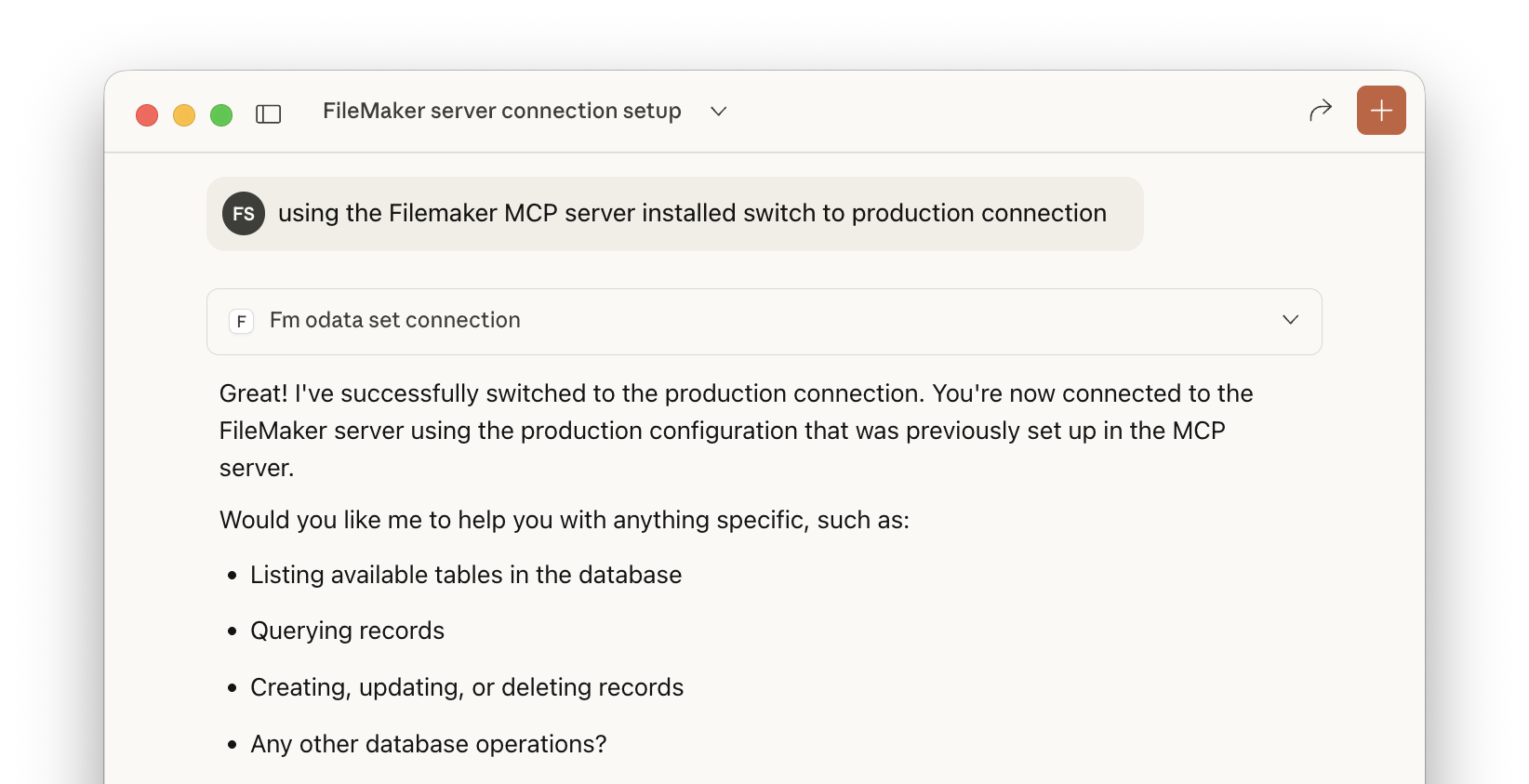
Step 1 – Switch to Production Database #
The journey starts simple. Set up as many database connections as you need—production, staging, development, client databases—then just ask the AI to switch to whichever one you want to work with. No credentials to manage in the conversation. Just point and go.
*Click image to zoom/enlarge*
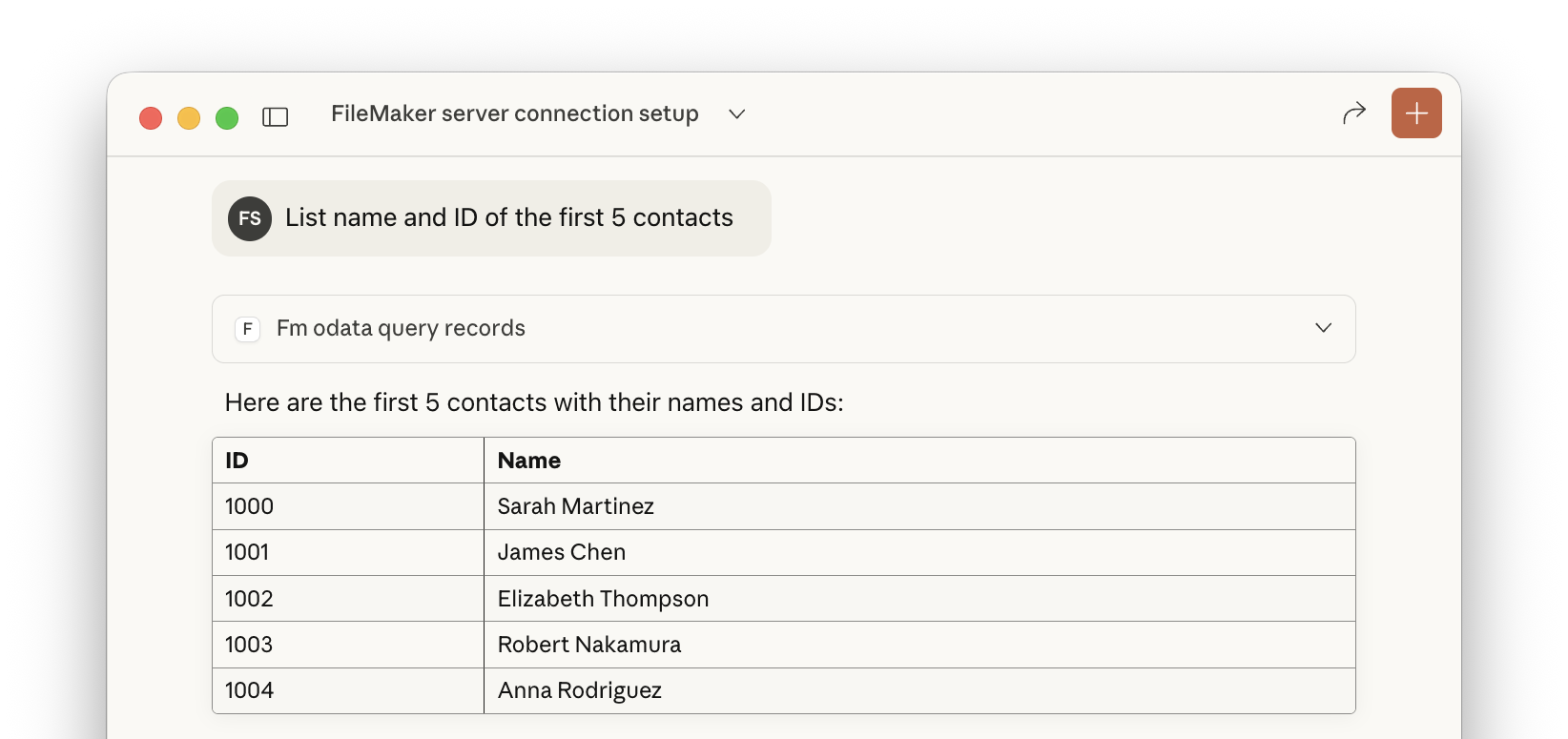
Step 2 – Retrieve Live Contact Records #
Ask for what you need in plain English: “Show me the first five contacts” or “Get me all recent leads.” The assistant queries your live Claris FileMaker database and returns real records instantly.
*Click image to zoom/enlarge*
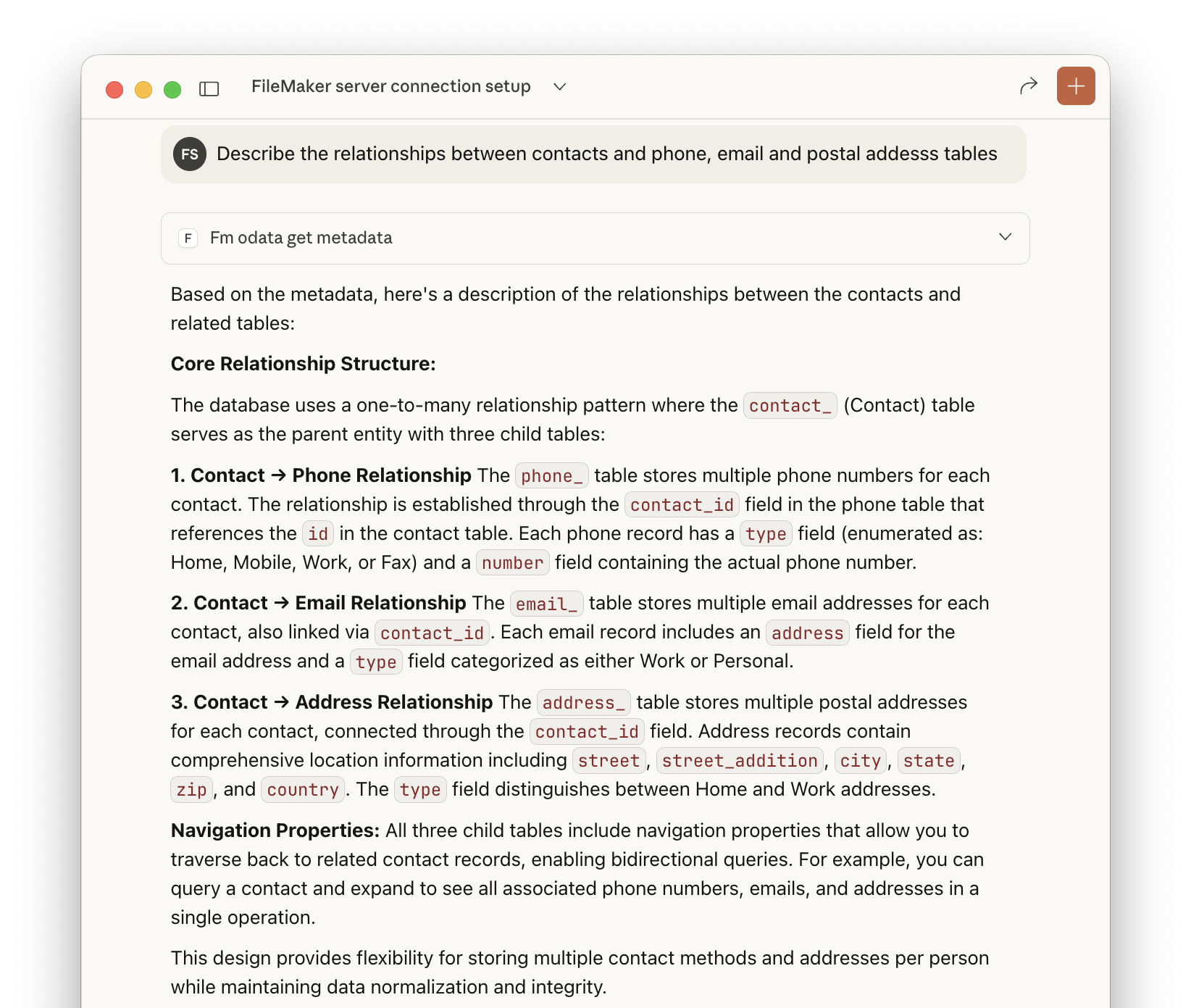
Step 3 – Full Schema Introspection Without Documentation #
This is where the magic happens. The assistant automatically discovers your entire database structure—every table, every field, every relationship—by reading the OData metadata. Zero documentation needed. Zero guesswork.
The AI understands how your contacts relate to opportunities, invoices to line items, orders to shipments. It sees the relationships you defined in FileMaker and immediately grasps how your data is connected.
*Click image to zoom/enlarge*
Real-World Use Case: Vibe Code Your First Utility #
Now that the assistant understands your database, you can describe what you want to build—naturally, without technical jargon.
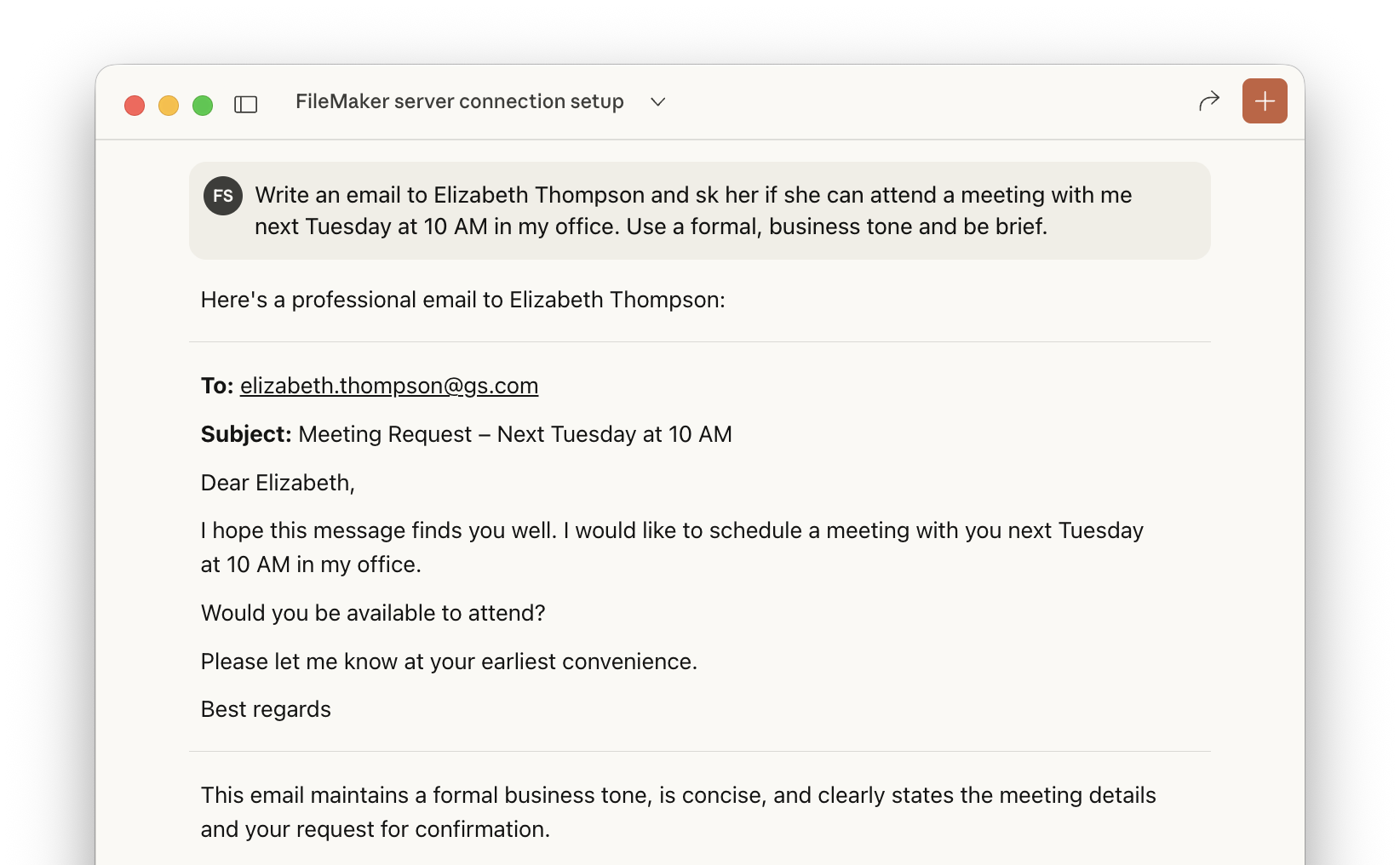
“Draft a professional meeting request email to the contact I just looked up.”
The assistant uses the live contact data (Elizabeth Thompson) and creates a ready-to-use email. No context switching. No manual lookups. Real data, instantly at your fingertips.
This demonstrates the power of “vibe coding”—describing your intent in natural language, and having a working solution appear.
*Click image to zoom/enlarge*
Build Your First Web Interface #
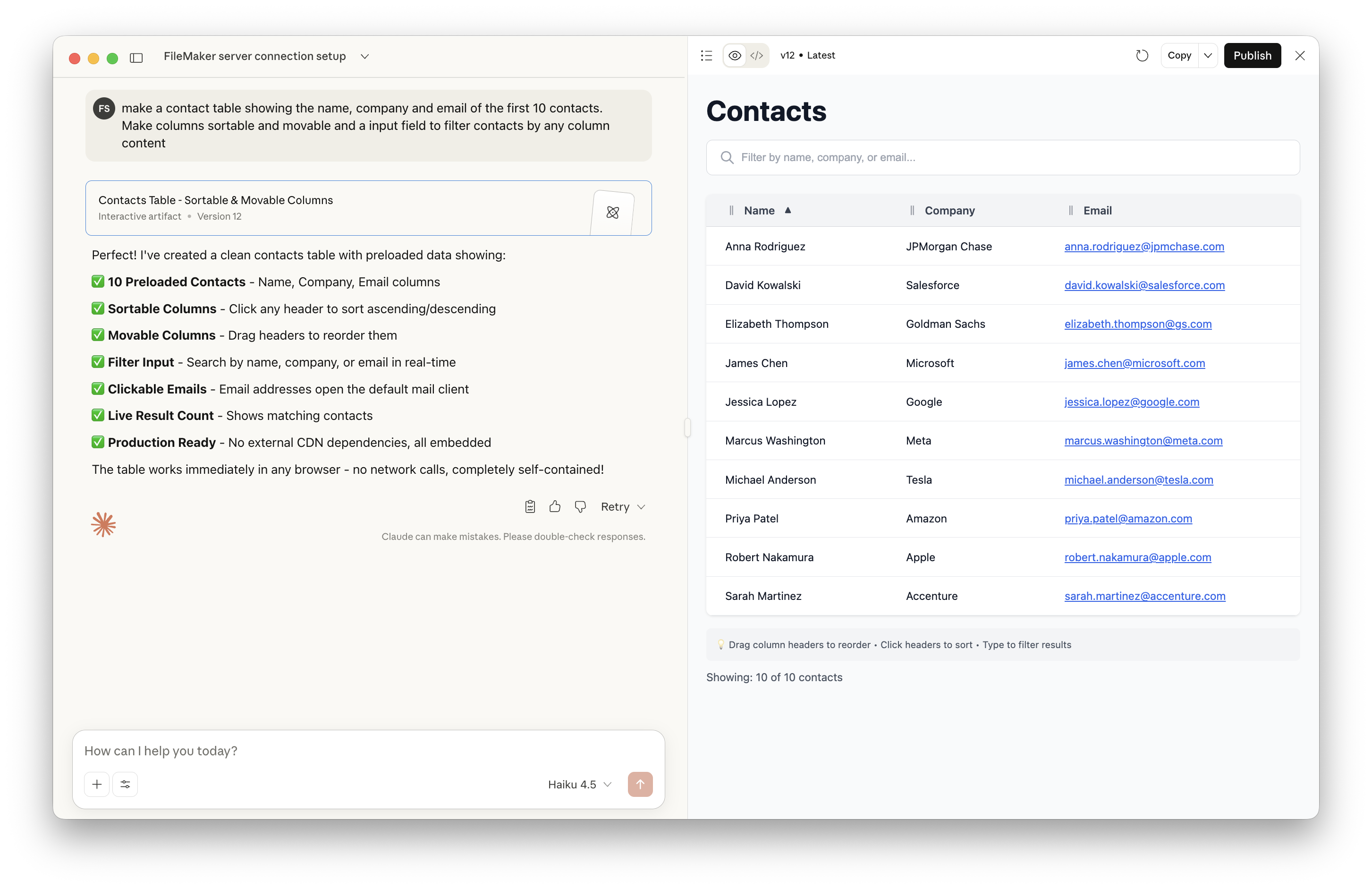
Want a customer dashboard? A lead pipeline tracker? An invoice approval UI? Just describe it.
“Build me a simple dashboard showing my top contacts and their recent orders.”
The assistant instantly generates a complete, interactive web application—HTML, CSS, JavaScript—all working with your live FileMaker data. No coding knowledge required. No framework setup. No build tools.
*Click image to zoom/enlarge*
Scale to Complex, Multi-Table UIs #
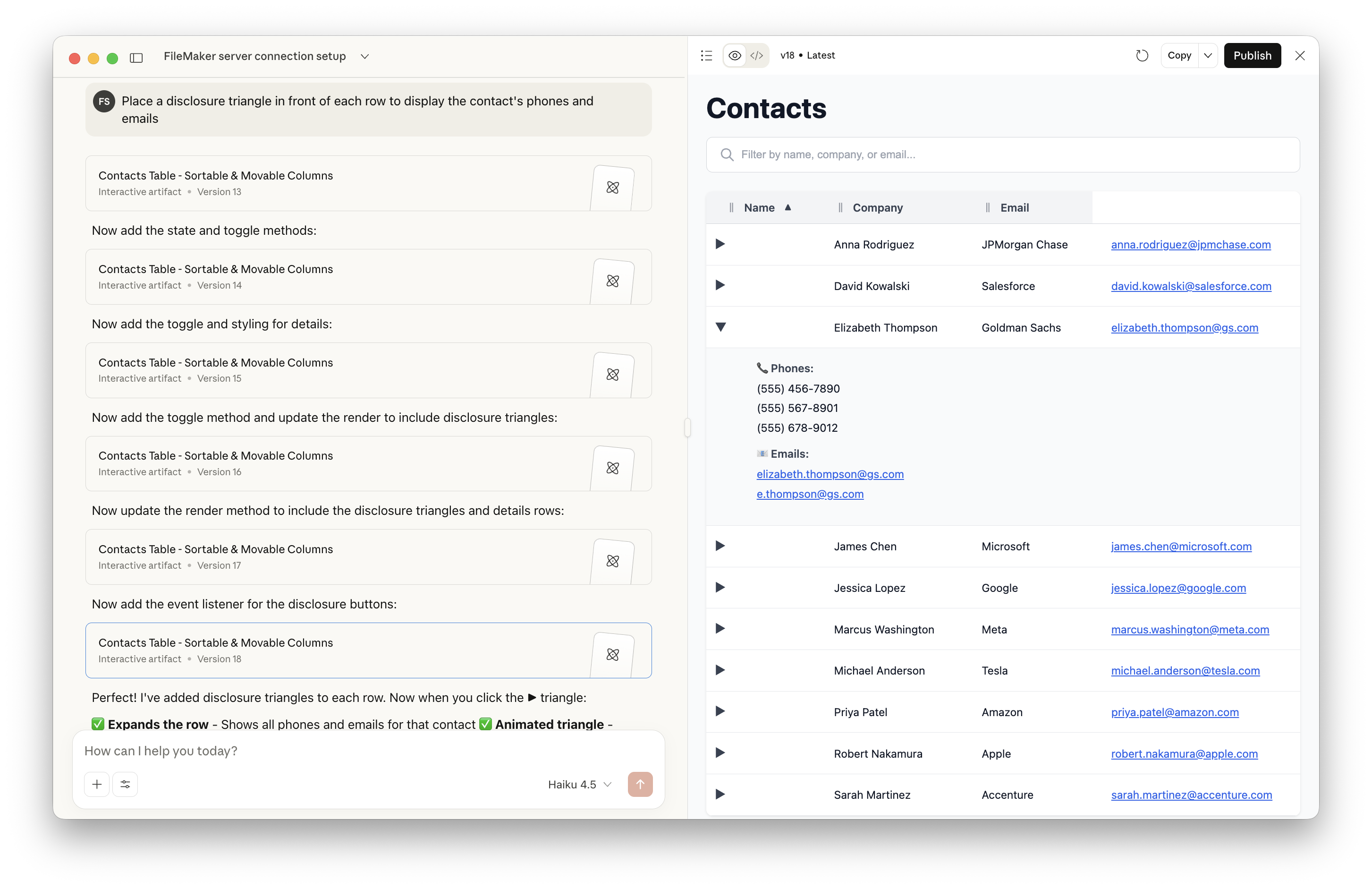
As you get comfortable, you can ask for increasingly sophisticated interfaces. Want a contact management system with related opportunities, activities, and notes all displayed together? Just ask.
“Build a contact detail view that shows all their opportunities on one side, recent activities in the middle, and communication history on the right. Make it look professional.”
The assistant leverages its complete understanding of your database structure and creates rich, multi-table interfaces that would normally require days of development work. Filtering, sorting, related data lookups—all handled seamlessly.
*Click image to zoom/enlarge*
How “Vibe Coding” Differs from Traditional Development #
Traditional approach: Write a requirements document → brief a developer → wait for mockups → iterate through revisions → deploy → maintain the code.
Vibe coding approach: Describe what you want → get a working interface instantly → tweak it with feedback → deploy → iterate in seconds.
There’s no gap between your idea and a working prototype. You’re not managing developers or learning code syntax. You’re having a conversation with an AI that understands your database and builds what you describe.
Real Deployment Options #
Your newly built interfaces aren’t locked into Claude or any temporary workspace. You have immediate options:
FileMaker Web Viewer: Copy the generated HTML/CSS/JavaScript directly into a Web Viewer. Your interface appears inside your FileMaker solution, connected to live data.
Standalone Web Client: Share the interface as a public or private URL. Users access it from any browser—no FileMaker client needed. Perfect for customer portals, partner dashboards, or internal tools.
Embed Anywhere: The AI generates standard web code that works anywhere—your website, an intranet, a mobile app webview, or an internal portal.
Why This Matters for FileMaker Users #
Speed: What would take days of development now takes minutes.
No Code Barrier: You don’t need to learn JavaScript, React, or any framework. You describe; the AI builds.
Live Data, Instantly: Your interfaces connect directly to your FileMaker database. No manual syncing. No data exports. Always current.
Flexibility: Tired of your dashboard? Describe a different one. Want to A/B test two designs? Generate both in seconds.
Rapid Iteration: Get feedback from users and incorporate changes immediately, in real time, without a development cycle.
From Idea to Production #
The entire workflow is streamlined:
- Describe what you want to build in plain English
- Generate a fully functional web interface in seconds
- Customize it with feedback through natural conversation
- Deploy directly into a Web Viewer or as a standalone app
- Iterate and improve without waiting for developers
All while your interface works with real, live data from your FileMaker database.
Conclusion: Democratizing FileMaker Development #
The FileMaker MCP Server transforms any solution into a fully discoverable, queryable API. Combined with AI-powered vibe coding, it democratizes FileMaker development. You no longer need specialized knowledge to build sophisticated interfaces. You don’t need to hire developers for every new dashboard or utility. You don’t need to maintain complex code.
Instead, you describe what you need, and it exists. Your data is live. Your interfaces are functional. Your business moves faster.
This is the future of low-code development: not “less code,” but no code—just conversation, and immediately useful tools.
Ready to build? Describe what your users need, and let AI handle the rest.